A clip of a fruit fly’s brain, wired up to a video game and steering with its own neurons, has been going around social media for the last few weeks. Most of the reactions I have seen fall into two camps: “AI is basically a brain now” or “this is fake, it’s just a neural network with extra steps.” Both are wrong in interesting ways, so I spent a weekend building my own version of this to find out what is actually going on, down to the neuron.
The short answer: it is not “a neural network” in the sense anyone using
PyTorch means that phrase. It is a wiring diagram of a real animal’s nervous
system, measured neuron by neuron and synapse by synapse from an electron
microscope, running as a simulated circuit with no training step anywhere.
This post explains what that wiring diagram is, how to get your own copy of
it, how the simulated neurons work, and how that differs from the kind of
network you would build for a classification task. At the end I walk through
2track.py, a small program I wrote that makes the fly track a green laser
dot through a webcam, using the fly’s own control scheme instead of the x/y
joystick you would normally bolt onto something like this.
Everything below is real code from a working harness I built this month, and the full implementation is public: github.com/paoloo/flybrain, MIT licensed. Every equation and constant quoted in this post is also in that repository, along with the full tracking script and exactly where to get the underlying data yourself.
What is actually being simulated
The wiring comes from MaleCNS v1.0, a connectome of the complete central nervous system (brain plus nerve cord) of an adult male Drosophila, published by the FlyEM team at Janelia with collaborators at Cambridge, the MRC Laboratory of Molecular Biology, and Google Research. It was built by imaging a single fly’s nervous system at 8 nanometer resolution with electron microscopy and then tracing every neuron and every synapse in the resulting volume. The paper reports 166,691 neurons and 11,691 cell types (Berg et al., Cell 189(18):5504, 2026, DOI 10.1016/j.cell.2026.08.015).
That is the important part to sit with for a second: nobody designed this network. Nobody chose the number of layers or the connectivity pattern. It is a direct reading of one physical brain, down to which cell talks to which other cell and how many synapses connect them. The “training data” was evolution and one fly’s actual life.
The dataset is released under CC-BY at male-cns.janelia.org/download, as a set of flat tables: per-neuron annotations, predicted neurotransmitters, and a connection-strength table listing every synapse-weighted edge. It is public and free. Anyone can download it and run the numbers themselves, which is most of what this post is about.
Getting your own copy of the connectome
The four files you actually need are small enough to list directly. This is the exact set my download step pulls, taken from the official MaleCNS bucket and a companion GitHub repository that publishes the optic-column assignments:
BASE = "https://storage.googleapis.com/flyem-male-cns/v1.0/connectome-data/flat-connectome"
FILES = {
    "optic-columns.xlsx": "https://raw.githubusercontent.com/flyconnectome/2025malecns/"
                           "67767d2233657983993ff6c2be48e836a935863c/supplemental_data/"
                           "optic-column-type-assignments-v1.0.xlsx",
    "annotations.feather": f"{BASE}/body-annotations-male-cns-v1.0-minconf-0.5.feather",
    "transmitters.feather": f"{BASE}/body-neurotransmitters-male-cns-v1.0.feather",
    "weights.feather": f"{BASE}/connectome-weights-male-cns-v1.0-minconf-0.5.feather",
}
A plain curl on each URL is enough, no authentication required:
for name in optic-columns.xlsx annotations.feather transmitters.feather weights.feather; do
    echo "fetching $name"
done
curl -L -o annotations.feather "$BASE/body-annotations-male-cns-v1.0-minconf-0.5.feather"
curl -L -o transmitters.feather "$BASE/body-neurotransmitters-male-cns-v1.0.feather"
curl -L -o weights.feather "$BASE/connectome-weights-male-cns-v1.0-minconf-0.5.feather"
Total download is a bit over a gigabyte, almost all of it the weights table (about 1 GB by itself; the annotation and transmitter tables are 14 MB and 41 MB). On a normal connection that is a few minutes, not an overnight job.
Once you have the raw tables, three things turn them into a usable graph:
- Decide which cells count. Keep every neuron with a non-empty
superclassannotation. That comes out to 166,700 rows on my run, 9 more than the paper’s headline 166,691, because it includes 94 rows marked “to be confirmed” that still carry a real superclass label. Filtering by proofreading status instead would silently drop real sensory cells, so I kept the same rule the reference implementation uses. - Sign the weights. Each row in the weights table is a raw synapse count between a presynaptic and a postsynaptic cell. The sign comes from the presynaptic cell’s predicted neurotransmitter: GABA, glutamate, and histamine are treated as inhibitory, everything else (acetylcholine, unclear, etc.) as excitatory. This is the one place the model quietly introduces an approximation: real receptors can flip a transmitter’s effect on the postsynaptic cell, and the predictions themselves are confidence-scored, not certainties.
- Normalize. Each neuron’s incoming weights are divided by the total absolute weight arriving at that cell, so no single postsynaptic neuron gets overwhelmed just because it happens to have thousands of inputs. After this step my build has 25,582,938 directed, signed, weighted edges between 166,700 neurons.
None of that selection recipe is my invention. It is the exact rule published
by the ornata/fly project (nicknamed fly64,
because its original version drove Super Mario 64 through a fly brain),
documented in their docs/technical-notes.md. I followed it line by line,
but wrote the loader itself from scratch rather than copying theirs, since
that repository ships no license. The full, unabridged version I actually
run is flybrain/data.py in
github.com/paoloo/flybrain,
MIT licensed, safe to read and reuse.
Two cell-type lists matter for anything you build on top of this. 6,006 neurons of type R1-6, R7, and R8 are the photoreceptors, the fly’s eyes. A handful of named descending neuron types (DNg100, DNa02, DNg13, DNp01, DNp10) are the ones whose firing rate gets read out as a motor command later in this post. Both lists come straight from the published annotations, by cell-type name, nothing guessed.
Turning the four raw tables into a sparse matrix, applying the three rules
above, is about 150 lines of NumPy and Arrow calls in data.py. Reading it
end to end is a genuinely good exercise in understanding what “signed,
normalized synapse weight” means before you trust a number that came out of
someone else’s script, mine included.
The neuron model: leaky integrate-and-fire, not backpropagation
Here is the part that actually surprises people once they see it. Each of the 166,700 neurons holds exactly one number: its membrane voltage. Every 20 milliseconds, every neuron’s voltage is updated at once, using this rule (parameters as used in ornata/fly’s model):
v = exp(-dt/tau) * v + gain * (W @ spikes) + tonic + noise + retina
Reading it left to right:
- Passive leak. Voltage decays toward zero with a 100 millisecond time constant. Nothing pushing it, and it settles back to rest.
- Synaptic current. Whichever neurons spiked on the previous tick inject current into their targets, scaled by the normalized, signed weights from the connectome. Because a small fraction of neurons spike on any given tick, this is a sparse matrix-vector product, not a dense one.
- Tonic drive, a small constant current (0.180 in this model) that keeps the whole network gently active instead of sitting silent. This value and the synaptic gain (1.5) are hand-tuned so that a visual event is actually visible downstream in the motor pools. They are engineering knobs, not something measured in a live fly.
- Noise. A seeded random process gives roughly 1.2% of neurons a small push each tick. Same seed, same frames in, same spikes out, so experiments stay reproducible while the network is never perfectly still, the way a real nervous system never is either.
- Retinal drive, current derived from the fly’s vision, injected only into the photoreceptors. More on this in the next section.
When a neuron’s voltage crosses 1.0 it spikes and resets to zero. That is the entire “training” story: there is none. No gradient, no loss function, no weight update, ever. The network is a fixed dynamical system, and everything interesting that happens is the wiring plus the input driving it.
Here is that equation as running code (abridged; this is the actual update loop, one tick):
DT = 0.020          # seconds per neural tick (50 Hz)
TAU_M = 0.100        # membrane time constant

def step(self, rgb, now=None):
    sensory = self.encode_retina(rgb)                    # light -> drive
    current = np.asarray(
        self.w[:, np.flatnonzero(self.spikes)].sum(axis=1)
    ).ravel() * self.synaptic_gain                       # gain * W @ spikes
    baseline = self.rng.random(self.n) < (1.2 * self.dt)  # seeded noise
    self.v *= np.exp(-DT / TAU_M)                         # passive leak
    self.v += current + baseline.astype(np.float32) * 0.22 + self.tonic_current
    self.v[self.visual] += sensory * 0.62                 # retina -> eyes only
    fired = self.v >= 1.0                                 # spike decision
    self.v[fired] = 0.0                                   # reset
    self.spikes[:] = fired
    self.history.append(fired[self.motor_nodes].copy())   # feed the decoder
    return self._decode(now), np.flatnonzero(fired)
One line is worth staring at: self.w[:, np.flatnonzero(self.spikes)]. That
slices the weight matrix down to only the columns belonging to neurons that
fired on the previous tick. On a smoke test I ran, 11,919 of the 166,700
neurons fired on a given tick, so the update only ever touches a small slice
of the 25.6 million edges. The connectome defines what could talk to what.
The spikes decide what actually does, tick by tick.
How this is different from a network you would train
If you have trained a network before, the differences are worth spelling out one at a time, because each of them breaks an assumption you probably carry in without noticing.
Start with where the weights come from. In a trained network, an optimizer chooses the weights to minimize a loss. Here the weights are measurements: synapse counts from a microscope, signed by a transmitter prediction, normalized by a fixed rule. Nothing ever adjusts them at runtime. If you want the network to get better at a task, that is work you would have to add yourself, and it is not part of this model.
State and time are also real, not an abstraction. A standard feedforward network computes layer by layer in one pass, with no memory between calls. Here every neuron carries state, its voltage, between ticks, so the same visual input arriving at two different moments can produce different spikes, because history is part of the computation. The model runs at 50 simulated ticks per second, continuously, not once per input.
Sparsity is structural rather than a training artifact. A dense network multiplies every weight on every forward pass, whether or not that weight matters right now. Here a neuron that did not spike contributes exactly nothing to the next tick, no pruning or approximation involved. That falls directly out of the discrete, event-based nature of a spike.
Nothing is learned, ever. No backpropagation, no reward signal touching a weight, no fine-tuning. Behavior only emerges because a fixed graph is being driven by a changing stimulus plus background noise.
The units mean something, too. In a trained network, individual neurons in a hidden layer usually do not correspond to anything you can name. Here a specific neuron has a cell-type name, a predicted transmitter, and known synaptic partners, because it is the same neuron the microscope imaged. You can point at “DNa02” and know it is a real, physical cell type in a real fly, not a slot in a matrix.
And noise is a feature, not something you disable at inference time. A typical network runs deterministically once trained, maybe with dropout during training only. Here the seeded background noise runs continuously, so stimuli modulate an already-active network instead of switching it on from a silent baseline, closer to how an actual animal’s nervous system behaves at rest.
If you remember one line from this section: a trained neural network is optimized to solve a task. This one is a scaffold of measured biology that happens to be simulate-able, and any “task” it solves is something you build on top of it by hand, the same way I did for the game controls below.
The eyes: from a video frame to photoreceptor current
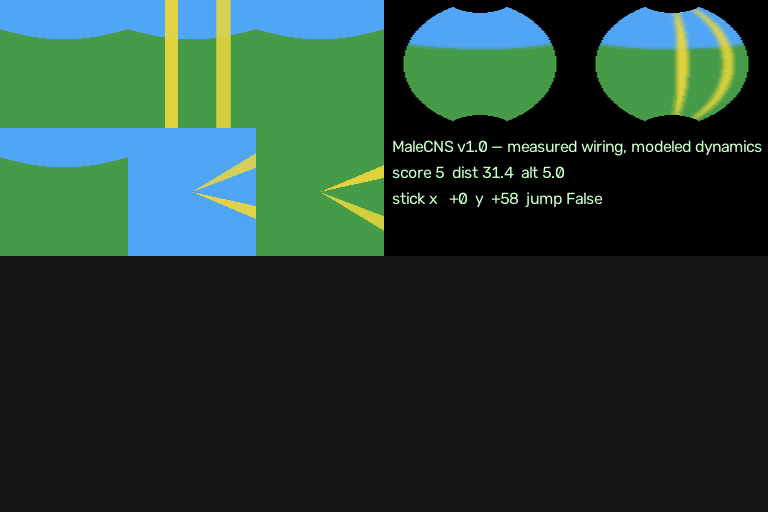
The fly needs something to look at. In this harness the world is rendered as six 128x128 square images tiled into a 384x256 atlas, in effect an unwrapped view of everything around the fly’s head (this layout is called a cube map, the same trick game engines use for reflections and skyboxes).
Each of the 6,006 photoreceptors is assigned a direction in space based on its known optic-column position, and samples the atlas through a small seven-point acceptance cone (one central sample plus six around it, roughly 2 degrees across), rather than a single pixel. That softens the sampling the way a real ommatidium’s angular sensitivity does, at least approximately. The angular field, about 270 degrees horizontal and 72 degrees up and down, follows the wide-field geometry described for the fly visual system in NeuroMechFly v2 (Wang-Chen et al., Nature Methods 21:2353, 2024).
Three signals are pulled out of each photoreceptor’s sample and combined into a single drive value between 0 and 1:
frame = self.retina.sample(rgb)                     # (6006, 3) receptor samples
lum      = frame @ [0.2126, 0.7152, 0.0722]          # luminance
temporal = np.abs(lum - prev_lum)                    # frame-to-frame change
color    = np.maximum(frame[:,1] - 0.5*(frame[:,0]+frame[:,2]), 0)  # green opponency
drive    = np.clip(0.45*lum + 1.6*temporal + 0.25*color, 0, 1)
Luminance carries the most weight after temporal change, because motion is what a fly’s visual system is built to detect first. Green opponency (how much more green a pixel is than the average of red and blue) is the smallest term, but it is exactly the signal the laser-tracking demo below leans on, since a green target lights up that term specifically and mostly ignores everything else in the scene.
Real flies see ultraviolet light and have no red-green-blue photoreceptor triplet the way a camera sensor does, so using RGB at all here is a stated approximation, not a measured biological fact. It is a convenient one, since every camera and every game engine already speaks RGB.
Feeding a webcam into it
Nothing about the brain cares where the cube-map atlas comes from. A webcam sees roughly 60 degrees of the world straight ahead, which corresponds almost exactly to the front face of the atlas. Feeding it in is a resize and a paste, leaving the rest of the atlas black:
cubemap = np.zeros((256, 384, 3), np.uint8)          # dark world, everywhere else
cubemap[:128, :128] = cv2.resize(frame, (128, 128))  # camera -> front face
That black background is honest, not a shortcut: a single webcam genuinely gives the fly no information about anything behind or beside it, so treating the rest of the sphere as darkness is the correct thing to do, not an approximation of convenience.
Once the frame is in place, one call runs the whole pipeline for a single 20 millisecond tick:
control, spikes = brain.step(cubemap, brain.step_count * brain.dt)
Two attributes end up doing all the work for anything built on top of this,
including the tracking demo below. brain.previous_rgb is the last (6006,
3) array of raw RGB values each photoreceptor actually sampled, before the
luminance/temporal/color math runs. brain.visual_pixels is a (6006, 2)
array telling you which atlas row and column each receptor looked at. Put
those two together and you can compute a weighted-average position of
anything colored in the frame, straight from the fly’s own eyes, which is
exactly the trick 2track.py uses to find the laser dot.
One frame-rate note worth keeping in mind if you build your own version: the
neural tick is defined as 20 milliseconds of simulated time, but nothing
forces you to call step() every 20 milliseconds of wall-clock time. Calling
it once per webcam frame (usually around 30 fps) just means the fly’s
subjective clock runs a little slower than the room around it. For a
closed-loop tracking demo that is completely harmless.
From spikes to a motor command
The simulation keeps a rolling window of the last 13 ticks (about 260 milliseconds) and averages spike counts inside four pools of descending neurons, the cells that carry signals out of the brain toward the muscles:
| Pool | Cell types | Reads out as |
|---|---|---|
| forward | DNg100 | forward thrust |
| steering | DNa02, DNg13 (split left/right by soma side) | right minus left = turn |
| jump/escape | DNp01, DNp10 | a burst above threshold triggers a jump |
recent = np.stack(tuple(self.history), axis=0).mean(axis=0)   # 13-tick window
forward_rate, left_rate, right_rate, jump_rate = [
    float(pool.mean()) for pool in np.split(recent, self.motor_splits)]
turn_rate = right_rate - left_rate             # right minus left, as in the real fly

raw_y = np.clip((forward_rate - 0.008) * 2000.0, 0, 70)
raw_x = np.clip(turn_rate * 1100.0, -70, 70)
self.filtered_y = 0.78 * self.filtered_y + 0.22 * raw_y   # smoothing
self.filtered_x = 0.78 * self.filtered_x + 0.22 * raw_x
jump = jump_rate > 0.04 and now - self.last_jump >= 0.8    # burst + cooldown
Everything past turn_rate in that snippet (the multipliers, the dead zone,
the smoothing constants) is an engineering choice made so a game character
moves in a legible way. No measurement in the connectome pins a specific
firing rate to a specific stick deflection. The one piece that does reflect
real biology is turn_rate itself: the right-minus-left difference between
those two named descending neuron types genuinely correlates with how a
walking fly turns, which brings us to the interesting part.
What a real fly does instead of x and y
A joystick is a convenience for a video game. A fly’s brain has no axis pair sitting inside it anywhere. Three things I checked against the actual papers, not just secondhand summaries, once I started wondering what the “real” version of a steering axis would even look like.
Steering turns out to be two independent channels, not one axis. Yang et al. (Cell 187(22):6290, 2024, DOI 10.1016/j.cell.2024.08.033) imaged and optogenetically perturbed these descending neurons in walking flies. The right-minus-left activity difference between DNa02 and DNg13 correlates linearly with rotational velocity and precedes the actual turn by about 150 milliseconds. DNa02 shortens the stride on the inside of a turn, DNg13 lengthens the stride on the outside, and because their upstream inputs barely overlap, the fly can recruit them independently rather than pushing one lever left or right.
Speed, meanwhile, is a population code rather than a slider. Namiki et al. (Current Biology 32(5):1189, 2022, DOI 10.1016/j.cub.2022.01.008) identified DNg02, a population of at least 15 nearly identical cell pairs. Activating more of them raises wingbeat amplitude close to linearly, about 2 degrees per cell pair. The fly does not turn up a throttle value; it recruits more copies of the same cell type, the way adding more workers to a job raises total output.
And the brain itself is too slow for the fast corrections. Dickerson et al. (Current Biology 29(20):3517, 2019, DOI 10.1016/j.cub.2019.08.065) showed that halteres, a fly’s modified hindwings, act as a mechanical gyroscope and retime the wing steering muscles within each individual stroke cycle, entirely in the thorax, without waiting on the brain. The brain sets slow goals; millisecond-scale stabilization happens locally, below it.
The demo decoder above (turn_rate, raw_x, raw_y) keeps the one piece
that matches this biology (right-minus-left steering) and cartoons the rest
into a joystick because a joystick is what a flying game needs. 2track.py
throws the joystick away entirely and rebuilds the control scheme using the
structure above: two independent steering signals, a recruited population
for throttle, and a small local loop standing in for the haltere reflex.
The demo: tracking a green laser, fly-style
Here is the actual task. Point a webcam at a green laser dot (or any saturated green object, a laser pointer is just the easy way to move a bright, small target around quickly) and have the simulated fly follow it, using only the control scheme described above, no x and y anywhere in the code.
The eye side of this reuses exactly the two readouts from the webcam section:
brain.previous_rgb for what each photoreceptor actually saw, and
brain.visual_pixels for where each photoreceptor was looking. A small
color-opponency score finds the green pixels:
WEIGHTS = {
    "green": (-0.5, 1.0, -0.5),
    "red":   (1.0, -0.5, -0.5),
    "blue":  (-0.5, -0.5, 1.0),
}

def color_score(eye, target):
    """Per-photoreceptor evidence that it sees the target color.
    eye: (6006, 3) RGB in 0..1, the brain's last retinal sample."""
    wr, wg, wb = WEIGHTS[target]
    r, g, b = eye[:, 0], eye[:, 1], eye[:, 2]
    return np.clip(wr * r + wg * g + wb * b - 0.15, 0, None)
The important step is splitting that score by hemisphere instead of turning it into a single position, because a real fly compares its two eyes, it does not compute a centroid:
def split_eyes(brain, target):
    """Compare the target signal in the LEFT vs RIGHT half of the visual field."""
    score = color_score(brain.previous_rgb, target)
    left  = float(score[brain.visual_pixels[:, 1] < 32].sum())   # left-eye columns
    right = float(score[brain.visual_pixels[:, 1] >= 32].sum())  # right-eye columns
    return left, right
left and right are the only two numbers the controller gets about where
the laser is. There is no “the target is at column 47” anywhere in this
path, only “the right eye currently sees more green than the left eye does.”
The controller itself is three small layers, matching the goal-then-local-loop hierarchy from the previous section:
N_CELLS = 8           # DNg02-style throttle population per side (real fly: 15+)
K_STEER = 0.9          # how strongly steering cells push the predicted rate
RATE_LIMIT = 60.0      # deg/s cap on the predicted turn rate

class FlyNaturalController:
    def __init__(self):
        self.rate = 0.0      # predicted body turn rate, deg/s (+ = right)
        self.effort = 0.0    # recruited fraction of the throttle population

    def step(self, left_score, right_score, target_col, dt):
        # 1. GOAL: the side with MORE evidence is the side the fly turns TOWARD
        steer_goal = right_score - left_score

        # 2. GOAL: total evidence sets how much of the throttle population fires
        effort_goal = np.clip((left_score + right_score) / 20.0, 0.0, 1.0)

        # 3. LOCAL LOOP: haltere-style first-order chase of the goals above
        steer_cmd = np.clip(steer_goal * K_STEER, -RATE_LIMIT, RATE_LIMIT)
        self.rate += (steer_cmd - self.rate) * np.clip(dt * 6.0, 0, 1)
        self.effort += (effort_goal - self.effort) * np.clip(dt * 4.0, 0, 1)

        # 4. ACTUATOR: population counts, not a slider
        l_cells = int(round(self.effort * N_CELLS))
        r_cells = int(round(self.effort * N_CELLS))
        if self.rate > 2:        # turning right: left side is the outer side
            l_cells = min(N_CELLS, l_cells + 1)
        elif self.rate < -2:
            r_cells = min(N_CELLS, r_cells + 1)

        return dict(l_cells=l_cells, r_cells=r_cells, rate=self.rate, effort=self.effort)
Note what never appears anywhere in that class: an x coordinate, a y coordinate, or a position setpoint. The only state is a predicted turn rate and a recruited fraction of a cell population, both of which chase a goal computed from the two hemisphere sums above. Turning also recruits an extra throttle cell on the outer side of the turn, echoing the wider wingstroke a real fly uses on the outside of a turn.
I tested this offline by pasting a green blob into a fixed position in the atlas and running 15 ticks per scenario, no webcam involved, just to check the signs come out right before pointing a camera at anything:
| Scenario | Predicted turn rate | Throttle (L/R) | What happens |
|---|---|---|---|
| blob left of center | -13.0 deg/s | 5 / 6 | turns left, right (outer) side recruits more |
| blob right of center | +10.1 deg/s | 5 / 4 | turns right, left (outer) side recruits more |
| blob centered | -2.3 deg/s | 6 / 7 | near zero rate, high effort |
| empty frame | 0.0 deg/s | 0 / 0 | idle, nothing to chase |
The sign is the whole point: the exact same target produces the opposite steering decision depending only on which hemisphere sees more of it, and the response is a rate that gradually integrates toward a turn rather than a position snapping into place. That is a direct behavioral consequence of using right-minus-left evidence instead of a centroid, and it falls out of the model for free, I did not have to add it.
Two geometry details matter if you build your own test scenes like the table above. The camera’s center of view lands at roughly atlas column 32.3, not column 32 exactly, because of how the resize maps onto the receptor grid. And the two eyes have a 17 degree region of overlap in the middle of the visual field, so a target sitting exactly in front of the fly lights up both hemispheres almost equally and the steering difference correctly goes toward zero, the same way it should for an animal looking straight at something.
Running it live is one line, assuming you have a FlyBrain object (see the
note below) and a webcam:
python 2track.py
It prints a running line like:
L-throttle 5/8 R-throttle 6/8 | L-steer -2.3 R-steer +2.3 | turn: -13.0 deg/s
and draws a small yellow crosshair on the video window at the position the fly’s own eyes computed for the target, so you can see directly whether the estimate tracks the real thing. I did not have a laser pointer within reach when I tested this, so the clip below is a green cloth instead, moved by hand across the frame; the tracking math does not care which one it is, only that it is saturated and green:
Watch the HUD in the top left corner: L/R are the recruited throttle
cells out of 8 per side, and rate is the predicted turn rate the local
loop is chasing. As the cloth moves, the crosshair follows it and the rate
swings sign with which hemisphere currently sees more green, exactly the
behavior in the offline table above, now driven by a live camera instead of
a pasted-in test blob.
Running this exact script
2track.py, in full, is at the bottom of this post. It imports FlyBrain
from flybrain/brain.py, and the whole package it lives in (brain.py,
retina.py, world.py, agent.py, data.py) is published, MIT licensed,
at github.com/paoloo/flybrain. Clone
it, run the data-preparation step from the “getting your own copy” section,
and 2track.py runs as shown, no reimplementation required. One detail
worth knowing if you go read retina.py: it started as a file copied
verbatim from ornata/fly, and I rewrote it from the documented specification
so the repository would not depend on code with no license attached. The
rewrite was checked against the original with a differential test over
randomized receptor layouts before I trusted it; the equations did not
change, only whose code they are.
Limitations worth keeping in mind
None of this should be read as “we simulated fly behavior.” A few honest caveats, straight from what I checked while building it:
- Inhibitory versus excitatory signs come from a transmitter prediction, not a direct measurement of receptor identity, so some individual connections could have the wrong sign where a receptor happens to invert its usual transmitter’s effect.
- The photoreceptor-to-direction mapping is exact for about 2,628 receptors with a published optic-column assignment, estimated from connectivity for another 3,242, and a deterministic fallback for the remaining 136.
- The motor-decoding thresholds (the 0.008 forward offset, the 0.04 jump burst, the 0.8 second cooldown) were tuned so a game character moves legibly. They are not measured in flies.
- Nothing here claims to reproduce fly behavior quantitatively. The paper’s actual contribution is the wiring and its analysis; the dynamics running on top of it, in this project and in the one it is based on, are stated engineering approximations.
Sources
- github.com/paoloo/flybrain, the full implementation this post is drawn from, MIT licensed.
- Berg, S. et al. “Sexual dimorphism in the complete Drosophila male central nervous system connectome.” Cell 189(18):5504-5526.e15, 2026. DOI 10.1016/j.cell.2026.08.015.
- MaleCNS v1.0 data distribution: male-cns.janelia.org/download
- ornata/fly, the project this model’s dynamics and selection rules are faithful to (studied for its documented rules and parameters; no code from it ships in the flybrain repository).
- Wang-Chen, S. et al. “NeuroMechFly v2: simulating embodied sensorimotor control in adult Drosophila.” Nature Methods 21:2353-2362, 2024. DOI 10.1038/s41592-024-02497-y.
- flyconnectome/2025malecns, source of the optic-column assignment spreadsheet.
- Yang, H.H. et al. “Fine-grained descending control of steering in walking Drosophila.” Cell 187(22):6290-6308.e27, 2024. DOI 10.1016/j.cell.2024.08.033.
- Namiki, S. et al. “A population of descending neurons that regulate the flight motor of Drosophila.” Current Biology 32(5):1189-1196.e6, 2022. DOI 10.1016/j.cub.2022.01.008.
- Dickerson, B.H. et al. “Flies Regulate Wing Motion via Active Control of a Dual-Function Gyroscope.” Current Biology 29(20):3517-3524.e3, 2019. DOI 10.1016/j.cub.2019.08.065.
Full code: 2track.py
"""2track.py - webcam tracking done the way a real fly does it: hemispheric
steering, a population-code throttle, and a local proportional loop below
the brain. No x/y stick anywhere.

Run:    python 2track.py
Quit:   press q in the video window
"""

import cv2
import numpy as np

from flybrain.brain import FlyBrain

CAMERA_INDEX = 0          # try 1, 2, ... if the wrong camera opens
TARGET = "green"          # "green", "red" or "blue": the point to follow

WEIGHTS = {
    "green": (-0.5, 1.0, -0.5),
    "red": (1.0, -0.5, -0.5),
    "blue": (-0.5, -0.5, 1.0),
}

ROW_CENTER = 23.5
COL_CENTER = 33.8

N_CELLS = 8              # DNg02-style throttle population per side
DEGS_PER_CELL = 2.0       # Namiki et al.: ~2 degrees of stroke per recruited cell

K_STEER = 0.9             # how strongly steering cells push the predicted rate
K_CENTER = 0.05           # slow pull toward keeping the target near the fovea
RATE_LIMIT = 60.0         # deg/s cap on the predicted turn rate


def color_score(eye, target):
    """Per-photoreceptor evidence that it sees the target color.
    eye: (6006, 3) RGB in 0..1 (the brain's last retinal sample)."""
    wr, wg, wb = WEIGHTS[target]
    r, g, b = eye[:, 0], eye[:, 1], eye[:, 2]
    return np.clip(wr * r + wg * g + wb * b - 0.15, 0, None)


def eye_position(brain, target):
    """Where does the fly's EYE see the target? Weighted-average atlas position."""
    score = color_score(brain.previous_rgb, target)
    if score.sum() < 0.5:
        return None, None, 0.0
    w = score / score.sum()
    row = float((brain.visual_pixels[:, 0] * w).sum())
    col = float((brain.visual_pixels[:, 1] * w).sum())
    return row, col, float(score.sum())


def split_eyes(brain, target):
    """Right-minus-left visual evidence: the signal that would drive the
    steering descending neurons."""
    score = color_score(brain.previous_rgb, target)
    left = float(score[brain.visual_pixels[:, 1] < 32].sum())
    right = float(score[brain.visual_pixels[:, 1] >= 32].sum())
    return left, right


class FlyNaturalController:
    """Goal layer (brain-like) + local layer (haltere-like), no x/y anywhere."""

    def __init__(self):
        self.rate = 0.0        # predicted body turn rate, deg/s (+ = right)
        self.effort = 0.0      # recruited fraction of the throttle population

    def step(self, left_score, right_score, target_col, dt):
        # ---- 1. GOAL: steering goal from the R-L difference ----------------
        steer_goal = (right_score - left_score)

        # ---- 2. GOAL: throttle goal = a recruited fraction of the population
        effort_goal = np.clip((left_score + right_score) / 20.0, 0.0, 1.0)

        # ---- 3. LOCAL LOOP: first-order dynamics toward the goals ----------
        steer_cmd = np.clip(steer_goal * K_STEER, -RATE_LIMIT, RATE_LIMIT)
        self.rate += (steer_cmd - self.rate) * np.clip(dt * 6.0, 0, 1)
        self.effort += (effort_goal - self.effort) * np.clip(dt * 4.0, 0, 1)

        # ---- 4. ACTUATOR COMMANDS: one per side, population-coded ----------
        l_steer = np.clip(-self.rate * 0.2, -10, 10)
        r_steer = np.clip(+self.rate * 0.2, -10, 10)
        l_cells = int(round(self.effort * N_CELLS))
        r_cells = int(round(self.effort * N_CELLS))
        if self.rate > 2:      # turning right -> left side is the outer side
            l_cells = min(N_CELLS, l_cells + 1)
        elif self.rate < -2:   # turning left  -> right side is the outer side
            r_cells = min(N_CELLS, r_cells + 1)

        return dict(l_cells=l_cells, r_cells=r_cells,
                    l_steer=l_steer, r_steer=r_steer,
                    rate=self.rate, effort=self.effort)


def draw_fly_view(view, row, col):
    """Draw the fly's estimate of the target position (yellow crosshair)."""
    if row is None or col is None:
        return
    if col >= 32:
        az = -8.5 + (col - 32) / 31 * 143.5
    else:
        az = -135.0 + col / 31 * 143.5
    el = 72.0 - row / 47 * 144.0
    if abs(az) > 45 or abs(el) > 45:
        return
    u, v = np.tan(np.deg2rad(az)), np.tan(np.deg2rad(el))
    x = int((u + 1) / 2 * view.shape[1])
    y = int((1 - v) / 2 * view.shape[0])
    cv2.circle(view, (x, y), 14, (0, 255, 255), 2)
    cv2.line(view, (x - 20, y), (x + 20, y), (0, 255, 255), 1)
    cv2.line(view, (x, y - 20), (x, y + 20), (0, 255, 255), 1)


def main():
    brain = FlyBrain()                  # real connectome; FlyBrain(fixture=True) for offline
    cap = cv2.VideoCapture(CAMERA_INDEX)
    ctrl = FlyNaturalController()
    print(f"following the {TARGET} point, fly-style (no x/y stick); q quits")
    print("     L-throttle R-throttle | L-steer  R-steer | predicted turn")
    last_line = ""
    t_last = cv2.getTickCount()
    while True:
        ok, frame = cap.read()
        if not ok:
            break
        frame = cv2.flip(frame, 1)

        cubemap = np.zeros((256, 384, 3), np.uint8)
        cubemap[:128, :128] = cv2.resize(frame, (128, 128))
        control, spikes = brain.step(cubemap, brain.step_count * brain.dt)
        dt = (cv2.getTickCount() - t_last) / cv2.getTickFrequency()
        t_last = cv2.getTickCount()

        row, col, _ = eye_position(brain, TARGET)
        left_score, right_score = split_eyes(brain, TARGET)

        cmds = ctrl.step(left_score, right_score, col, dt)

        line = (f"L-throttle {cmds['l_cells']}/{N_CELLS}  "
                f"R-throttle {cmds['r_cells']}/{N_CELLS} | "
                f"L-steer {cmds['l_steer']:+5.1f}  R-steer {cmds['r_steer']:+5.1f} | "
                f"turn: {cmds['rate']:+6.1f} deg/s")
        if line != last_line:
            print(line)
            last_line = line
        draw_fly_view(frame, row, col)
        cv2.putText(frame, f"L{cmds['l_cells']} R{cmds['r_cells']}"
                    f"  rate {cmds['rate']:+.0f} deg/s", (10, 30),
                    cv2.FONT_HERSHEY_SIMPLEX, 0.9, (0, 255, 0), 2)
        cv2.putText(frame,
                    f"spikes/tick {len(spikes)}  fwd {control.forward_rate:.3f}"
                    f"  turn {control.turn_rate:+.3f}",
                    (10, 60), cv2.FONT_HERSHEY_SIMPLEX, 0.6, (200, 200, 200), 1)
        cv2.imshow("2track: fly-natural control (q quits)", frame)
        if cv2.waitKey(1) & 0xFF == ord("q"):
            break
    cap.release()
    cv2.destroyAllWindows()


if __name__ == "__main__":
    main()